TeamWork + 4 Phases
Note: Visual Diagram below. But the video covers material not in the guide below — please watch in full.
Action Step
Complete this before moving on.
You should already have access to the Attribution Four Phase test project inside of Teamwork. If you don't, request access so you can see a live example. Once you're in, click through the milestones, open a few task lists, and read the descriptions on the individual tasks. Look at the board view, the table view, and the milestone rollup to see how the same data shows up in different ways.
Teamwork Architecture
Before mapping the four phases into Teamwork, you need to understand how Teamwork itself is structured. The hierarchy has five levels: Clients sit at the top. Each client contains one or more Projects. Each project is broken into Milestones. Each milestone contains Task Lists. And each task list contains the individual Tasks.
That hierarchy matters because the four phases plug directly into it. Every level has a purpose, and once you see how they connect, the whole system clicks.
How the Four Phases Map In
The four phases — Strategy, Engineering, Enablement, and Handoff — become the four milestones inside each project. Every project gets four milestones by default, one for each phase.
The sub-phases within each phase become the task lists under that milestone. For example, the Strategy milestone contains task lists for Pre-Kickoff, Kickoff, Alignment Loop, Strategic Output Creation, and the Strategic Phase Checklist. Each of those task lists then holds the individual tasks required to complete that sub-phase.
Every task has a description and an estimated time. When these get pushed via the API from Claude Code, they auto-populate with dates as well. This structure is the same across all projects — Attribution, Growth Model, Sales Lifecycle, CPQ Implementation, HubSpot to Salesforce Migration, Lead Routing, all of them.
Use +/- or scroll to zoom into the diagram, drag to pan
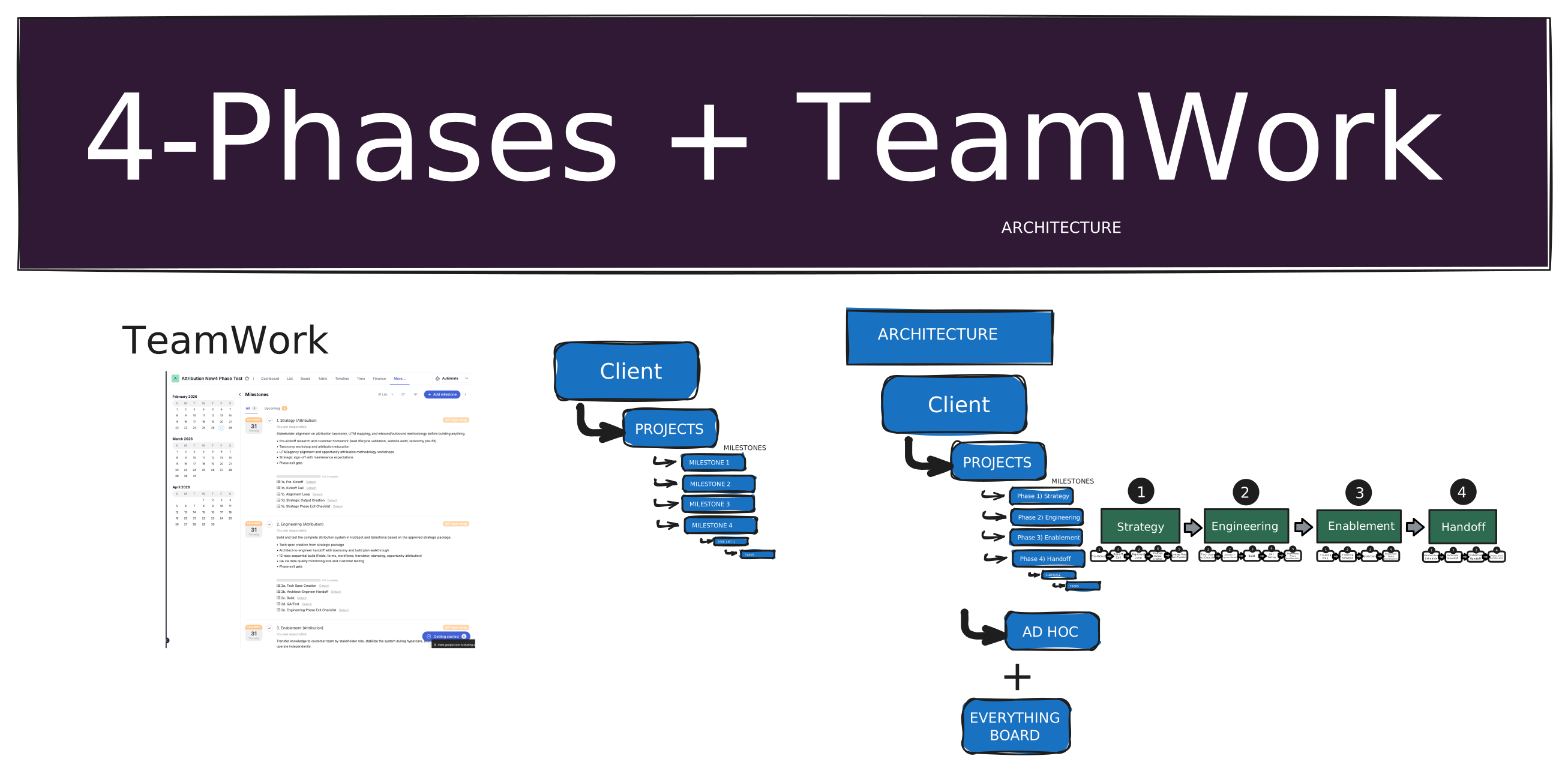
A Live Example: Attribution
Inside Teamwork, the Attribution Four Phase test project shows exactly what this looks like in practice. Go to More, then Milestones, and you'll see the four phases listed out: Strategy, Engineering, Enablement, Handoff.
Click into Strategy and you'll see the sub-phases as task lists. Click into a task list and you'll see the description of what that sub-phase covers, plus the individual tasks within it. This is the pattern every project follows.
Ad Hoc and Managed Services
Not everything fits neatly into a four-phase project. Every client also gets an Ad Hoc or Managed Services project. This is where you log time against tasks that don't belong to one of the ongoing structured projects — things that are either ad hoc requests or managed services work.
Because this isn't a standard four-phase project, it doesn't have milestones or sub-phase task lists built out the same way. It's simply a catch-all for work that falls outside the active project scope.
The Everything Board
Teamwork has an Everything Board that rolls up all tasks across every project for a given client. Go to More, then Everything, and you'll see the full picture — every task from every project, with due dates and descriptions, all in one view.
This is also where the LeanScale task stages come in. You'll learn more about those in an upcoming training, but the short version is that you push tasks from left to right on this board to track progress across all projects at the client level.
Exploring the Views
The Attribution test project gives you multiple ways to look at the same data. The board view shows tasks organized by stage — right now everything sits in backlog. The table view shows all task lists with their individual tasks broken out underneath. And the milestone view lets you see the rollup, click into task lists, and drill down into tasks from there.
Each milestone also has auto-populated descriptions that explain what that phase covers. Later on, you'll learn how Claude Code can generate all of these templates for every project automatically.
Comment in Slack
Post your answer in your onboarding channel.
What was your biggest takeaway(s) from this training?